

There are many online discussions about how to put several microcontrollers into a deep sleep mode to achieve this. In fact, the ESP32 microWatt was designed around this concept, which is why it has an onboard buck converter instead of a linear voltage regulator. The buck converter is not only more efficient at producing the 3.3V bus, but it also has a much lower dropout voltage. Since the ESP32 microWatt was designed to be powered by a single-cell 3.7V/4.2V LiPo battery... But that's beside the point of this post.
What we're showing in this post is the thermal response of microcontrollers during deep sleep, as well as active modes. Our thermal camera is able to accurately see when the microcontroller wakes up, as the thermal signature heats up rapidly. Then, during deep sleep, we can see the heat dissipate into the PCB and nearby components.
For our tests, we are considering two popular microcontroller development boards:
PTSolns Nano Flip, and
PTSolns ESP32 microwatts
Onboard these two development boards are microcontrollers (the ATmega328P for the Nano Flip and the ESP32 for the ESP32 microWatt), which heat up and cool down as you'd expect. But this experiment demonstrates why the ESP32 microWatt is a clear choice for any battery-powered application. Keep reading to find out why!
Test Setup:
Each of the two boards was set up similarly. Both have an external button that toggles the microcontroller between deep sleep mode and active mode. During deep sleep, everything that can be turned off is powered down. During active mode, we ran some sketches that load the microcontroller and also blinked the onboard LED rapidly.
As you can see in the video, we should improve the button bounce, as button presses aren't registering correctly sometimes. However, this isn't a major issue for what we're doing here. A simple software debounce would do the trick.
For the Nano Flip, the power supply comes from the connected USB-C cable. On this dev board, it makes little difference whether it's powered from the USB-C port or the Vin pin. In both cases, the onboard CH340 IC is powered, drawing a small current and therefore producing a thermal signature that we can capture with the thermal camera.
For the ESP32 microWatt, the power supply comes from the external Vin pin. This is important because with this configuration the onboard CH340 IC remains OFF, thus saving power. We can easily see this on the thermal camera.
Finally, to put it all together, the Nano Flip is inside the NTEA-LG, and the ESP32 microWatt sits inside the ESP BoB. Both breakout adapter boards make this setup super quick and convenient. No breadboard is required.
One final note on the setup. Since the ESP32 is enclosed in a metal can (likely for FCC compliance), we forcibly ripped it off to expose the ESP32 IC inside and get a better thermal image. In reality, it's quite easy to remove the metal can without any force; just a pair of needle-nose pliers will do the trick.
Results:
For complete results, please refer to the video . We found that the microcontrollers heat up very quickly relative to surrounding components as soon as they are activated by pressing a button. As soon as they enter deep sleep mode, the peak heat signature of the microcontroller drops and is dissipated into the PCB and nearby components. Both the ATmega328 onboard the Nano Flip and the ESP32 onboard the ESP32 microWatt behave in the same way.
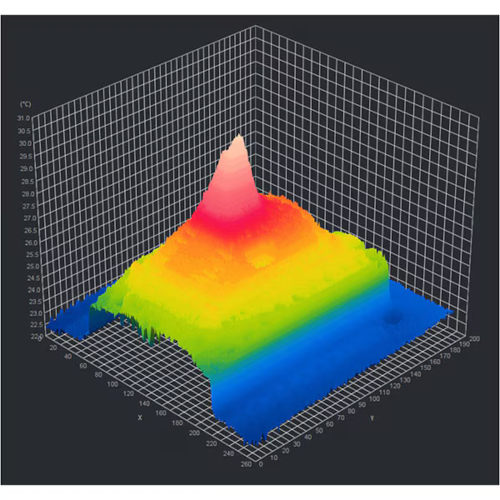
The following image shows the 3D thermal image of the ESP32 IC while in active mode. The hot spot in the middle is located on the IC itself. Note that when we say "hot" here, it's not actually that hot, and well within normal and safe operating conditions.
Image of the thermal response of microcontrollers during deep sleep and active modes
What we found interesting during these tests is how the CH340 gets hot in the Nano Flip but stays cool in the ESP32 microWatt. This is due to the board's design and is a strong indication that it's working. This is also another reason why the ESP32 microWatt is a great choice for battery-powered applications: the CH340 IC remains off when not in use.
Finally, we also see an interesting artifact that we discussed at the very beginning of the video: infrared (IR) light reflection. Shiny metal components, such as the USB-C port, the metal cans in the glass (inside the ESP32), or even the component wires, can appear warmer than they actually are by reflecting IR light and fooling the camera. We see this clearly on the Nano Flip at the very beginning of the video. The board is completely in thermal equilibrium and is not powered in any way (it has been off for over 10 hours). However, when recorded with the thermal camera, some of the shiny metal components appear several degrees warmer. This artifact or phenomenon changes with the angle or when the board is rotated. This can be tricky at first—"Why is THIS part getting hot?"—but it's easy to spot once you know what it is.
Author: Rolf Horn, DigiKey