

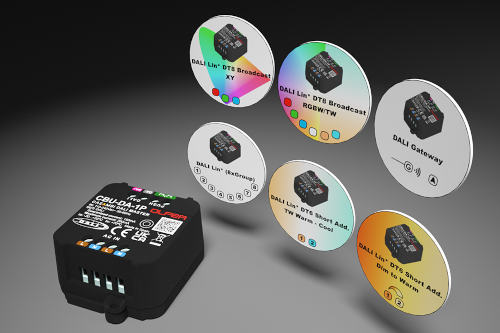
Having mentioned its main features, this article will focus on one of the most distinguishing aspects of this product, which makes it the most versatile device: the availability of nearly 100 different Casambi profiles. These offer a wide variety of control modes, allowing you to use the product in virtually any situation.
To load the desired profile, simply connect your CBU-DA-1P while it is unpaired and open the Casambi app. Then, go to "More -> Nearby Devices -> Tap on your device's icon -> Change Profile." Next, we will explain the control modes of some of the most noteworthy profiles available for this product.
CBU-DA-1P PROFILES
• “DALI Broadcast”
Performs simultaneous control of all connected DALI drivers.
• “DALI Broadcast + External”
enables simultaneous control of all connected DALI drivers. It also allows the connection of DALI-2 light/presence sensors and DALI-2 pushbutton modules, which will appear in the app as if they were Casambi sensors or pushbuttons (up to a maximum of 8 pushbuttons).
• “DALI 1xDIM SA” … “DALI 8xDIM SA”
enables independent control of up to 8 connected DALI drivers. DALI addressing is performed automatically, and the app's user interface will display the same number of sliders as the number of drivers the selected profile can control (1-8 drivers).
• “DALI (1xGroup)” … “DALI (8xGroup)”
These allow zone control of up to 50 connected drivers divided into up to 8 DALI groups. Drivers can be assigned to DALI groups directly from the Casambi app without the need for any DALI programmer or external tool. The app's user interface will display the same number of sliders as the number of DALI groups the selected profile can control (1-8 groups).
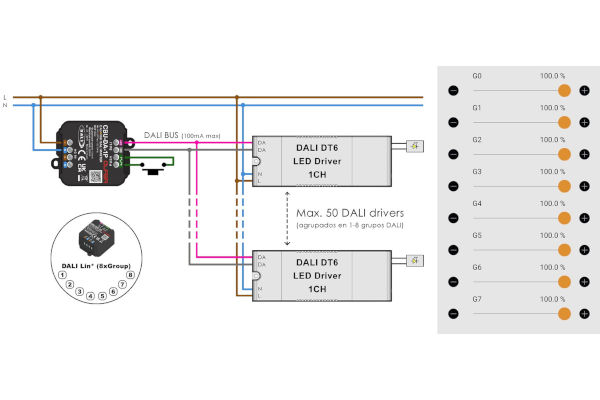
Figure 1. Connection diagram (left) and control interface (right) of the “DALI (8xGroup)” profile.
• “DALI DT6 TW”
Allows you to connect two different DALI addresses (A0 - warm and A1 - cool) to perform color temperature control independently of the power regulation of the luminaire.
• “DALI DT6 Dim to Warm”
allows you to connect two different DALI addresses (A0 - warm and A1 - cool) to control the color temperature based on the luminaire's power dimming. The light will be warmer at low dimming levels and cooler at high levels.
• “DALI DT6 RGB”
Allows you to connect three different DALI addresses (A0 – red, A1 – green and A2 – blue) to perform RGB color control.
• “DALI DT6 RGBW”
Allows you to connect four different DALI addresses (A0 – red, A1 – green, A2 – blue, and A3 – white) for RGBW color control. The white channel has a dedicated slider in the app.
• “DALI DT6 RGB/W”
Allows you to connect four different DALI addresses (A0 – red, A1 – green, A2 – blue, and A3 – white) for RGBW color control. A slider will appear in the app to control the ratio between the white channel and the RGB mix.
• “DALI DT8 TW Broadcast”
performs simultaneous control of all connected DALI DT8 (Tc) drivers. It allows for power and color temperature control of the luminaires using independent sliders. Different color temperature ranges are available so that the profile can be adapted to the LED modules used.
• “DALI DT8 TW (2xSA)”
Allows independent control of up to two connected DALI DT8 (Tc) drivers. DALI addressing is automatic, and the app's user interface displays two sliders to control the power and two more sliders to control the color temperature for each address.
• “DALI DT8 TW (3xSA)”
These allow independent control of up to 3 connected DALI DT8 (Tc) drivers. DALI addressing is automatic, and the app's user interface displays three sliders to control the power of each luminaire and an additional slider to control the color temperature for all three.
• “DALI DT8 TW (2xGroup)”
Allows independent control of up to two groups of connected DALI DT8 (Tc) drivers. Drivers can be assigned to DALI groups directly from the Casambi app without the need for any DALI programmer or external tool. The app's user interface displays two sliders for controlling the power and two more sliders for controlling the color temperature of each group.
• “DALI DT8 TW (3xGroup)”
Allows independent control of up to 3 groups of connected DALI DT8 (Tc) drivers. Drivers can be assigned to DALI groups directly from the Casambi app without the need for any DALI programmer or external tool. The app's user interface displays three sliders to control the power of each group and an additional slider to control the color temperature for all groups.
• “DALI DT8 Dim to Warm”
Allows you to connect DALI DT8 (Tc) drivers to control the color temperature in relation to the luminaire's power dimming. The light will be warmer at low dimming levels and cooler at high levels.

Figure 2. Example of Dim to Warm profile application. As we reduce the luminaire power, the color temperature becomes warmer. With the “DALI DT8 Dim to Warm” profile, we can control up to 50 drivers.
• “DALI DT8 RGB”
Allows you to connect DALI DT8 (RGB) drivers to perform RGB color control.
• “DALI DT8 RGBW”
Allows you to connect DALI DT8 (RGBW) drivers for RGBW color control. The white channel has a dedicated slider in the app.
• “DALI DT8 RGB/W”
Allows you to connect DALI DT8 (RGBW) drivers for RGBW color control. A slider will appear in the app to control the ratio between the white channel and the RGB mix.
• “DALI DT8 RGB/TW”
Allows you to connect DALI DT8 (RGB/Tc) drivers to perform RGB color and color temperature control.
• “DALI DT8 RGBW/TW”
Allows you to connect DALI DT8 (RGBW/Tc) drivers to perform RGBW color control and color temperature.
• “DALI DT8 XY”
Allows you to connect DALI DT8 (XY) drivers to perform RGB color control using XY coordinates.
• “DALI DT8 XY/TW”
Allows you to connect DALI DT8 (XY/Tc) drivers to perform RGB color control using XY coordinates and color temperature.
• “DALI Gateway”
Allows the device to act as a gateway between a wired DALI line and a wireless Casambi network.
• “DALI Push Button“
Allows the connection of DALI-2 push button modules so that they will appear in the app as if they were Casambi push buttons (up to a maximum of 8 push buttons).
• “Push Button“
Allows the connection of up to 2 NO push buttons to act on our Casambi network.

Figure 3. Connection diagrams of the “DALI Push Button x8” (top) and “Push Button x2” (bottom) profiles.
The complete list of profiles, as well as the app's user interface and the connection schemes associated with each profile, can be found at the following link: https://www.olfer.com/olfer-cbu-da-1p.html
As you have discovered throughout this article, the CBU-DA-1P device can provide solutions for a wide range of projects, as it allows you to control up to 50 DALI drivers. The available Casambi profiles encompass all the possibilities you might encounter when dealing with DALI systems (groups, short addresses, DT6, DT8, RGB, TW, Dim to Warm, RGBW, XY, etc.).
Furthermore, you can also connect DALI-2 input devices such as sensors and push-button modules to transform them into Casambi devices. In addition, Olfer Electronics' profiles perform an initial self-configuration of these types of devices to ensure compatibility transparently to the user and without the need for expensive external tools for DALI programming.
Without a doubt, the new CBU-DA-1P is a useful and versatile tool that any Casambi solutions integrator should seriously consider.
Author: Adrián Garcés / R&D Engineer at OLFER Electronics.