


Currently, the USB interface is ubiquitous and its adoption is widespread. Despite its ubiquity, engineers must consider some essential technical specifications for its operation: the USB connector standard—or physical form factor—(Type A, B, or C, mini-B, etc.), the data transfer speed (USB 3.0, USB 3.2, USB 4.0, etc.), and the USB power delivery standard (USB 2.0, USB PD 3.0, USB 3.1, etc.).
In this article, we will discuss the USB interface, briefly review its evolution, and explain why it has become the standard charging port for consumer electronics devices in the European Union and the United Kingdom.
The Origins of Connectivity in Personal Computers:
Believe it or not, USB has been around for about 26 years, and during that time it has had a huge impact on the computer and consumer electronics industry. The USB 1.0 standard appeared in 1996 in response to the need to connect external peripherals to a computer. Since then, the adoption of this interface has rapidly gained momentum. Its use has expanded to connect and power many devices, such as mobile phones, smartwatches, fitness devices, and home security cameras. As a simple and practical interface, its success was guaranteed, and it displaced other older and slower connectivity methods used in the 1990s, such as the RS-232 serial port and Centronics parallel ports. Currently, the USB interface offers much more than its initial transfer capacity. For example, practically everyone who owns a mobile phone uses its charging and power supply functions daily. Furthermore, data transfer speeds have increased considerably.
The Evolution of USB:
The launch of USB 1.0 introduced a connector with a faster transfer speed (1.5 Mbps) than other serial interfaces at the time. It also introduced the ability to connect/disconnect a peripheral or external storage device without turning off the computer, something impossible with other interfaces. In addition to defining the software protocol, USB 1.0 also specified the first standards for USB connectors: Type A and Type B. The Type A connector (the one used as a connector in a computer) is still in use today and is the design we all mentally associate with the word USB. Type B, a square connector, is still used, although it is less common than Type A (Image 1).
USB quickly gained market share thanks to its simple four-wire interface and the ease of assembling the connector and cable. Two years later, in 1998, the new USB 1.1 protocol ushered in much faster transfer speeds, up to 12 Mbps, with the Full Speed standard. Backward compatibility with USB 1.0 was maintained, and devices using that protocol automatically reverted to 1.5 Mbps.
Market adoption continued to grow as computer and peripheral manufacturers began focusing on USB and ceasing support for other interfaces. This, in turn, led other equipment manufacturers to join the trend, further increasing the number of entities adopting the interface.
In 2000, the USB Implementers Forum (USB-IF) introduced the USB 2.0 High-Speed software specification, which increased the speed to 480 Mbps. This increase made it possible to access external storage, from hard drives to flash drives. This same specification also allowed USB to power connected devices (up to 0.5 A at 5 V), thus initiating the use of USB as a power source. Up until that point, both Type-A and Type-B connectors were widely used, but as computer hardware became more compact, mini-connectors began to replace Type-B. Shortly after 2007, micro-connectors arrived (Figure 2). Mini-connectors can still be seen on some older devices, but micro-connectors quickly became the dominant standard. Furthermore, as USB standards have evolved, the USB software protocol has diverged from the physical connector standard.
In 2008, the USB 3.0 software protocol (later known as USB 3.2 Gen 1x1) was released, with a theoretical transfer speed of up to 5 Gbps. This logarithmic speed increase was partly made possible by reducing the number of wires from four to eight, while maintaining backward compatibility with USB 1.0. Power delivery increased to 900 mA, and the Type-C connector was introduced (Figure 2).
USB 3.1 (later known as USB 3.2 Gen 2x1) doubled the speed to 10 Gbps. Shortly after, USB 3.2 (later known as USB 3.2 Gen 2x2) was introduced, again doubling the speed to 20 Gbps.
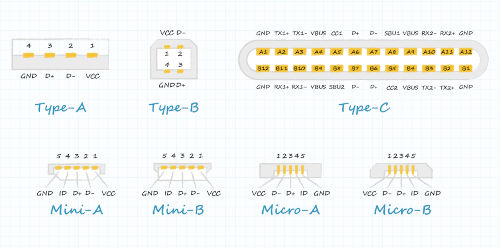 Image 2: The full range of USB connector formats (images are not to scale) (source: CUI Devices).
The USB 3.2 specification also focused on the Type-C connector, the first connector that could be plugged in either up or down. It's a compact form factor with rounded corners. As USB standards have evolved, so have the types of compatible devices. The Type-C connector expanded the number of use cases and established the concept of using the interface solely for charging and powering devices.
Towards USB 4 and Beyond:
The USB 4.0 specification was introduced in 2019 and doubled the speed to 40 Gbps. It is based on the Thunderbolt 3 protocol, with two transmission channels, and requires the use of a USB Type-C connector. In addition, USB 4.0 defined a specific video transfer method and featured significantly improved power delivery capabilities.
The Type-C and USB 3.2 standards also expanded power delivery capabilities, with a range of nominal output voltages up to 48 V DC and a current of up to 5 A, or up to 240 W of power. Figure 3 shows the power delivery standards, which have evolved independently of, but in conjunction with, the USB software protocols.
 Figure 3: The evolution of USB power delivery (source: CUI Devices).
The ongoing evolution of the USB interface has further accelerated its adoption, thanks to its ability to deliver higher power levels. For example, there are now USB-C connectors used solely for power.
The increased popularity of the USB-C connector has coincided with growing consumer frustration with the sheer number of chargers we use for our devices. In June 2022, the European Union announced a provisional agreement to establish a single charging solution for certain electronic devices. The vast majority of MEPs voted in favor of a new law requiring all new portable devices to use the same charging cable. From 2024, all new mobile phones and tablets must have a USB-C charging port, with laptops becoming mandatory from 2026. The UK government has not yet considered implementing similar legislation, although it is likely to follow the EU's lead.
Using USB Type-C:
When selecting a USB Type-C connector, we must consider the application requirements. Will it be used only for power or also for data? How much space is available on the board, and how will that influence the connector's location and orientation?
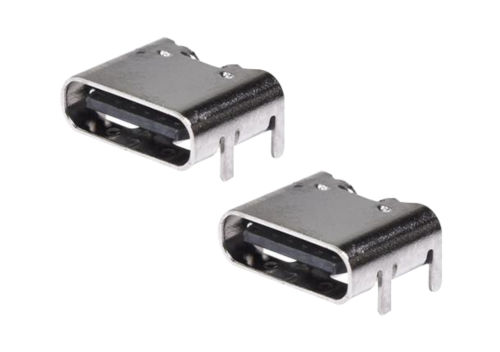
One example of a USB 4 Type-C connector is the UJ40 series from CUI Devices (Figure 4). The UJ40 series supports USB 4's 40 Gbps transfer speed and is rated for 5 A and 48 V DC for power. It is designed for 10,000 cycles. These surface-mount connectors are reflow-soldered, available in vertical or horizontal orientations, and have a UL 94V-0 flammability rating. The UJ40 can withstand voltages of 100 V AC, has an insulation resistance of 100 MΩ, and a contact resistance of 40 mΩ.
 Image 4: CUI Devices UJ40 (USB 4 Type C) connectors (source: CUI Devices).
For applications requiring only power, CUI Devices' UJC Type C connectors can be used. These models have a six- or eight-pin design and are available in horizontal or vertical surface-mount packages (Figure 5). The supply voltage is 20 V DC, and the current rating can be either 3 or 5 A.
Figure 5: CUI Devices UJC Type C connectors for USB power applications (source: CUI Devices).
Author: Mark Patricks, Mouser Electronics
The Omnipresence of USB:
USB began as a connection medium for external computer peripherals and has become the world's leading method for wired data transfer, as well as the power standard for consumer electronics. This interface has an amazing history and ever-increasing transfer speeds, so its future is guaranteed.