

SBench 6 provides an easy-to-use graphical interface for instrumentation control, as well as for data acquisition, generation, visualization, analysis, and documentation. New features, most of them free, expand the software's versatility by adding automation functionality and enhancing its signal processing capabilities and measurement accuracy.
For users who want a simple way to use SBench6 in an automated sequence of operations, a scripting tool is now available. Scripting allows basic commands to be organized through a plain ASCII file that is called by the SBench 6 program. For example, SBench 6 can be instructed to load specific configurations, start and stop acquisitions, wait or loop, export data, and even call external programs (see Figure 1).
Another useful addition is data interpolation. This powerful feature can be used to improve parameter measurements in situations where a digitizer's sampling rate is limiting measurement accuracy. Based on the SinX/x algorithm (sometimes called SinX), SBench 6's interpolation function predictively inserts samples between the actual data points acquired. When done well, this produces a waveform with a higher effective sampling rate and a closer approximation to the analog waveform being analyzed.
The benefit of interpolation becomes apparent as the input signal frequency begins to approach the Nyquist limit (half the sampling rate).
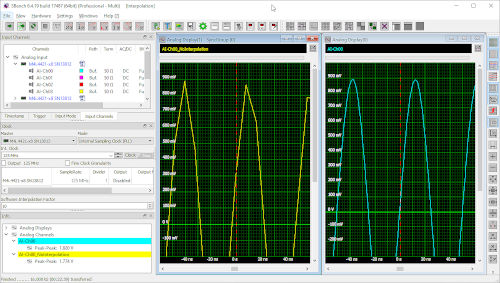 Consider Figure 2.Here, a 20 MHz sine wave with an amplitude of 1.82 V is acquired by a digitizer sampling at 125 MS/s with a 16-bit resolution. The yellow trace on the left shows the signal without interpolation, with the sampling points connected by straight lines. The blue trace on the right is the same signal but with interpolation enabled. Both traces have been expanded vertically to allow examination of the upper portion of the sine wave.
Note that the 20 MHz signal is still well below the Nyquist limit of 62.5 MHz. However, the yellow trace (without interpolation) already has an insufficient sampling rate to accurately measure the signal's amplitude. The problem is that, at 125 MS/s, each cycle of the sine wave contains only about six sample points. Enabling the interpolation function improves the sampling rate. In this example, an interpolation factor of 10 was selected, creating a trace with 60 samples per cycle. The peak-to-peak amplitude parameter measurements (lower left corner) taken for both traces demonstrate the significant improvement in amplitude accuracy that is possible.
Provided the frequency content of the input signal does not exceed the Nyquist limit, interpolation can also be used to improve other parameter measurements (such as rise and fall times, as well as cyclic measurements like frequency and period).
SBench 6-Professional has a wide range of data processing tools (e.g., FFT analysis, mathematical functions, filtering, averaging, parameter measurement, etc.) that can now be complemented by a new plug-in option. This allows users to create their own custom calculations as a self-compiled plug-in that automatically links to the SBench 6 calculation suite. The plug-in option includes an SDK as well as a series of examples based on the C++ programming language. It enables programmers to develop their own plug-ins by combining advanced calculations on the acquired signals. Any calculation that can be performed using standard development methods is possible. Furthermore, any system file (such as filter parameters, sensor calibration values, or reference signals) can be used in the calculation. The SDK also provides a callback function for user interaction, so that simple dialogs and other information, such as precautions or critical warnings, can be displayed to the user.
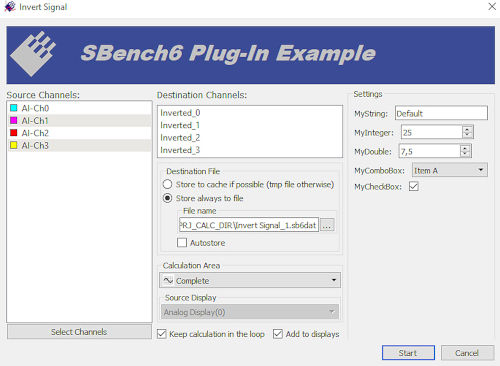 The plug-in option allows users to integrate their own processing functions into the SBench 6 program. The resulting signals can be displayed, used for further calculations, exported, or included in a report. For example, when using a digitizer with sensors, the plug-in could integrate sensor calibration information into the program. Figure 3 shows a typical plug-in example where the signals are inverted and stored. Note that the programmer can define the calculation settings using integer or double values, combo boxes, strings, or checkboxes.
Programming custom calculation routines can transform the SBench 6 software into a powerful, application-specific tool. Once the routines are developed, the resulting plug-in files can be freely distributed to end users under any SBench 6 Professional license.
Calculating Individual Values:
As part of SBench 6's enhanced measurement capabilities, the new Formula function now also allows for the calculation of individual values. These values can be calculated from cursor information, any sample of a source signal, or even other calculation results.
In addition to processing flexibility, individual values can even be accessed and incorporated into a formula when creating new waveforms with the program's Function Builder. The result is a powerful waveform creation tool that allows you to create waveforms using recorded or loaded signals, an extensive list of mathematical operations, and individual values.
To make configuring a digitizer's input ranges quick and easy, an input channel preview window has been added to SBench 6-Professional. This window works by continuously monitoring input signals at a low sampling rate and then displaying their key signal characteristics using a bar graph. The input channel preview window reveals, for each active channel, the current minimum, maximum, and average signal values. Color coding (green, red, and yellow) highlights signals that are within or outside the specified range, or when an input range has changed state. Users are instantly alerted to the condition of each channel, making it immediately obvious when changes to its gain or offset settings are required.
Free for all SBench 6 Professional users.
With the exception of the Custom Calculations Plug-in, which is optional, customers already using SBench 6 Professional can access the new capabilities (Scripting, Single Value Formula, Input Channel Preview, and Interpolation) free of charge. These features, along with other recent additions to the program, such as FFT-based power spectrum density measurements, are included.