Personal safety and the security of property are at risk. In response to the growing demand for secure data transmission, the KNX Secure standard has been developed to address current and future cybersecurity challenges in building automation.
3 key features of KNX Secure:
• Data integrity
: Preventing attackers from gaining control by injecting manipulated code. In KNX, this is ensured by adding an authentication code to each message: this embedded code verifies that the message has not been modified and that it does indeed originate from a trusted source.
• Code currency:
Attackers can record frames without manipulating the content, to play them back later. In KNX Data Secure, code currency is ensured by a sequence number, and in KNX IP Secure by a sequence identifier.
• Confidentiality
Encrypting network traffic ensures that an attacker has as little information as possible about the data actually transmitted. By enabling encryption of KNX network traffic, KNX devices guarantee at least encryption according to the AES-128 CCM algorithms along with asymmetric keys.
KNX Secure includes KNX IP Secure (IP media) and KNX Data Secure (TP/RF media). KNX IP Secure is used for KNX installations (typically their backbone) exposed to an external IP network, such as the internet. KNX Data Secure is used for KNX installations not exposed to an external IP network. This article focuses on KNX Data Secure. Each KNX Data Secure product ships with a unique FDSK (Factory Device Configuration Key), as shown in Figure 1. After the device key is added to an ETS project, it is automatically set. This means the user cannot manually define or modify the key, and it is never visible. From that point on, the device only accepts the key for subsequent configuration with ETS. The FDSK is no longer used during subsequent communication unless the device is factory reset, after which all data on the device will be erased.
 Figure 1. Location of the FDSK in a PWM-200-24KN
KNX Data Secure can only be used with devices that support and have enabled Data Secure. However, when secure communication is not required, KNX Data Secure devices can also be used with other KNX devices that do not support this standard. There are two ways for a device with secure transmission to work with a device that does not.
The first is to disable secure transmission on the KNX-Secure device (Figure 2). In this case, the device with KNX-Secure disabled will behave as a device without KNX-Secure.
The second way is to individually configure the group addresses as "Off" or "Automatic" (Figure 3). Then, it can be linked to group objects of devices with security enabled or disabled. All functional objects in a KNX Data Secure device can be configured with different security levels according to different requirements. For example, a touch panel control object can be configured for secure transmission, while an actuator object can be configured for insecure transmission.
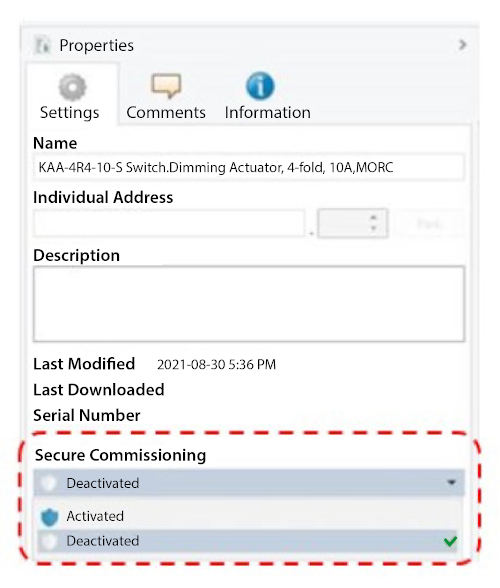
Figure 2. Safe Start-up activated/deactivated
Figure 3. Group address security configuration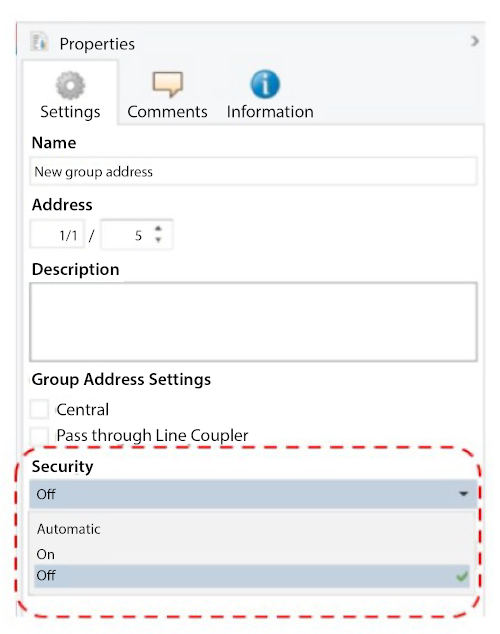
See Figure 4 for an example. It shows how to configure the KNX Data Secure buttons to switch to unsecured (Plain) mode while paired with an unsecured KNX device, while leaving the remaining buttons in Data Secure mode for communication with secure devices. Data Secure communication is recommended for applications involving personal or property security (such as door or window control). For applications unrelated to personal or property security (such as TV or coffee machine control), users can choose whether or not secure communication is necessary. Note that once an object is configured in unsecured mode, subsequent communication will no longer be protected by Data Secure.
 Figure 4. KNX system configuration
MEAN WELL will announce more new KNX Data Secure products and update existing products with Data Secure. OLFER Electronics will distribute these devices in Spain and Portugal.
Author: Gabriel Li/Technical Service Center
Translation: OLFER Electronics Marketing Department