

 The number of coffee machines, refrigerators, vending machines, and other appliances being equipped with TFT displays is expected to increase significantly in the coming years. I recently noticed that in many stores, the plastic slip where you normally place a receipt to sign has now been replaced by a 7-inch TFT screen displaying advertisements for products available in the store. The rise of "bathroom advertising" by companies across Europe and the world shows that there will soon be no escaping the TFT display.
So, what do you need for your application?
Let's start by looking at the main issue. What do you actually need to control a TFT display? Most TFT panels today use a digital RGB interface, either RGB888 or RGB565. The RGB value is a standard by which the red, green, and blue colors of each pixel are represented, with the corresponding number of bits. Thus, for 888, each color is given a full 8 bits of data (giving 24 bits per pixel), while in 565, red and blue are represented by 5 bits each, and green by 6 bits (giving 16 bits per pixel). Alternatively, instead of a standard digital display interface, you could be using an LVDS connector, which is increasingly becoming the standard for large displays. As such, the RGB signals are transferred via a differential signal, but the data format remains the same. So to begin with, you need a device that supports the generation of an RGB signal and/or an LVDS interface.
Secondly, the RGB data must come from a frame buffer, which is usually stored in RAM. This frame buffer is a bitmap image stored in the desired format. Therefore, a screen size such as WVGA (480x800) will require just over 1 MB of RAM to store an RGB888 image (480 x 800 x 24 bits = 1.125 MB).
In addition to the frame buffer that holds the current image to be displayed on the screen, a typical application will have a "back buffer" that holds the next image to be displayed. This allows the CPU to process the next image without the user seeing a partially processed image flickering on the screen before the CPU finishes. This dual-buffer system is very common and provides higher overall quality to the HMI, but it also means that your WVGA display needs an additional 1.125MB of RAM to store the buffer.
The story of RAM, however, sadly didn't end there. In a typical HMI application, it's not always necessary to manipulate the entire screen. For example, if an icon or button is pressed, it can animate, glow, rotate, or react in some way before the action is taken. In this case, what an HMI designer would do is define a separate layer from the image layer. There would be a background layer that would remain unchanged, and the icon or button would be a foreground layer that would be animated. This, obviously, also requires additional RAM—not full screen RAM, but some. The amount needed depends on the image size, but let's say, for example, that it's a 200 x 200 pixel button. Then we would need an additional 100KB of RAM. What would also be needed here is the ability to combine all these different layers with each other, and perhaps apply a level of transparency to some of these images. This can be done in software if the CPU is fast enough, or in hardware, if available.
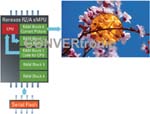 Therefore, to complete the RAM requirements overview, a reasonable HMI application can use approximately 3MB of image data for a WVGA screen size. If the code is executed from RAM, as is the case with most processors, an additional 0.5MB is required. Therefore, the minimum starting point for a WVGA display should be 3.5MB of RAM.
Of course, RAM access speed is also very important. As you've probably noticed, the RAM here is being written to and read from by several different sources simultaneously. For example, the front buffer (the original image data) is being read by the IP block to drive the data to the screen. At the same time, the back buffer might be being updated by the CPU or by a DMA transfer of a different image. Simultaneously, the CPU might be manipulating the aforementioned icon and reading its own code from RAM. This puts a lot of pressure on the RAM bus bandwidth. This bus is often the bottleneck in the application, so a good bus architecture is required to mitigate the risk of overloading the bus, which could result in the user seeing half-finished images, or worse, a non-functional graphical user interface.
Special attention must also be paid to CPU capacity. A system delivering 24 frames per second to the screen will have to manipulate and create data (in our example, a WVGA screen) at a rate of more than 24 MB per second. This can be done entirely by software, or partially by hardware, but either way, the CPU must be fast enough to meet these requirements.
Since we are now clearly discussing a processor solution, which will likely not have on-chip flash memory, the next requirement is the connection to external flash memory. The typical method today is to use an external parallel NOR flash to store the code and then, during boot, transfer this code into RAM to enable fast execution. However, more modern devices support other memory technologies to allow system architects to reduce system costs without the overhead of an expensive on-PCB NOR flash.
Most of these applications typically do more than just control a display. They also need to be connected to the rest of the system. Automotive applications are usually connected to a CAN or MOST bus. Industrial and consumer devices now require Ethernet and USB connections. These connections also mean that the most suitable product will not only need to incorporate hardware IP, but also have sufficient performance to manage its operation and enough code space to support its stacks.
 About the RZ/A:
The RZ/A family is an embedded MPU solution based on an ARM Cortex A9 core that offers numerous advantages for the HMI application market. The RZ/A offers up to 10 MB of on-chip SRAM, making it the largest on-chip RAM available. There are three variations in the family: the RZ/A1H, which includes the full 10 MB of RAM; the RZ/A1M, which has only 5 MB of RAM; and the RZ/A1L, the smallest device with 3 MB of RAM.
So, based on the previous discussion, where it was calculated that the HMI application would need approximately 3.5 MB of RAM, the RZ/A1M seems ideal for meeting these requirements. Of course, other solutions are available on the market that use external RAM, whether DDR SDRAM or even larger amounts, but the RZ/A family is the only product the author is aware of that offers this high level of internal RAM.
The RZ/A1H gives the system designer leeway to increase or decrease the screen size according to their needs and to create a cost-optimized version for lower resolution products.
The CPU's 400MHz performance is more than enough to run a simple HMI application and maintain communication via any protocol your system dictates, as all versions of the RZ/A family include CAN (up to 5 channels), Ethernet, USB (up to 2 channels), and even support MOST for automotive applications.
 In fact, the 400 MHz CPU is more than sufficient due to two unique features of the RZ/A. The first feature is the VDC. Renesas' video display controller provides hardware support for many of the functions necessary to create your final image on the screen. The VDC supports up to four different graphics layers, two of which can be inputs from an external camera. It also has hardware to support alpha blending. Alpha blending is a process by which each pixel is assigned an additional 8-bit alpha value. This alpha value determines the pixel's transparency, allowing it to be superimposed on top of another pixel to create the resulting image. The VDC also supports chroma-key operations, the most well-known use of which is in videography for "green screen" effects, whereby a particular color is defined as transparent so that an object can be superimposed on another image. In some systems, all of this would be done via software, but the RZ/A does it via hardware; therefore, the 400 MHz actually equates to a much higher performance level. The VDC also supports not only digital RGB connection to a TFT display but also LVDS.
The second factor in the RZ/A family that increases CPU performance is the elimination of the bandwidth problem we discussed earlier. A quad-core Tera-Hertz processor is only as fast as it can get data, and when data is stored in a single block of RAM that has to be accessed by a single bus, this forces the core to slow down. The RZ/A, however, has five separate RAM banks.
Each bank is connected to its own dedicated 128-bit bus, so it's actually possible to write to the back buffer, read from the front buffer, manipulate an icon, and complete a DMA transfer, all while executing code from the internal RAM. This results in a significant performance increase.
Of course, as mentioned earlier, a connection to external flash memory is also necessary, and the RZ/A is compatible with all normal non-volatile memory connections, such as NOR, NAND, SDIO, MMC, etc., but it also has a special SPI Multi-I/O serial flash connection that supports the new quad SPI protocol.
This QSPI can achieve performance figures similar to or better than those of a parallel flash, but with the economic advantages of a serial flash, such as saving microprocessor pins and reducing PCB size.
 In short: The RZ/A is simple.
Renesas's recently launched RZ/A device has been designed specifically for the human-machine interface market. There are several requirements in this market that, while not unique on their own, combine to make it very difficult to serve with traditional systems. The need for RAM is significant, but not as significant as that of a microprocessor with 128 MB of DDR3 RAM. The operating requirements are low, provided the device is supported by a display controller, but they are not low enough
that a microcontroller running at, say, 100 MHz could meet them.
The RZ/A offers ample connectivity for all HMI applications, more than enough performance, and a generous amount of RAM for flexibility. It's a dedicated, cost-optimized solution that will not only benefit the booming display technology market but also help drive its growth.
Author: Robert Kalman. Product Marketing Manager
Industrial Communications Business Group. Renesas Electronics Europe GmbH